A QUIT PORN APP FOR MUSLIMS

Quit porn with a better next step.

Block the apps that pull you back. Turn an automatic tap toward Quran, dhikr or dua. Build your nofap routine around a real phone boundary.

Available on iPhone & Android · Free download · In-app purchases

Blocking works differently on each platform. See your phone’s setup.
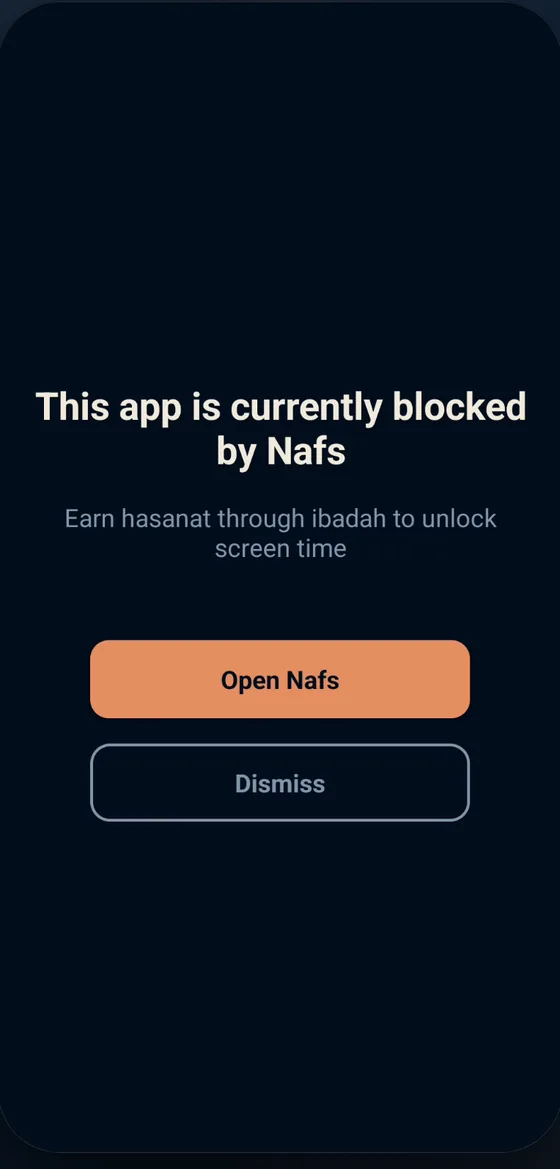
Nafs selected-app block screen with an Open Nafs button
One blocked tap. A chance to choose again.Actual Nafs app screen. Appearance may vary by device.

MAKE THE NEXT MOMENT EASIER

A boundary. A pause. A replacement.

Set it up while you feel clear, so there is a plan when the urge arrives.

  1. 01

    Choose your trigger apps

    In the Fortress tab, select the feeds, games or other apps that start your pattern. Follow the blocking-permission prompts on your phone.

  2. 02

    Close the adult-content route

    On Android, set up Guard for supported browsers. On iPhone, enable Nafs content protection with the required Screen Time access. Keep extra filtering in place for gaps and other devices.

  3. 03

    Give the pause somewhere to go

    Open Quran, dhikr or dua in Nafs. Choose a short worship action you can begin when the app block interrupts the next tap.

Worship comes before allowed screen time. Worship earns back screen time for ordinary apps you choose to allow. Adult content stays outside that exchange.

SOMETHING BETTER TO OPEN

Make the replacement
part of your phone.

A block is the interruption. What you do next is the habit you are building.

  • Read a little Quran.Start with a short passage instead of another search.
  • Return to dhikr or dua.Have a familiar worship action ready for a difficult moment.
  • Build a repeatable routine.Pair your phone boundary with sleep, support and a plan for your triggers.
Read the practical PMO and habit plan
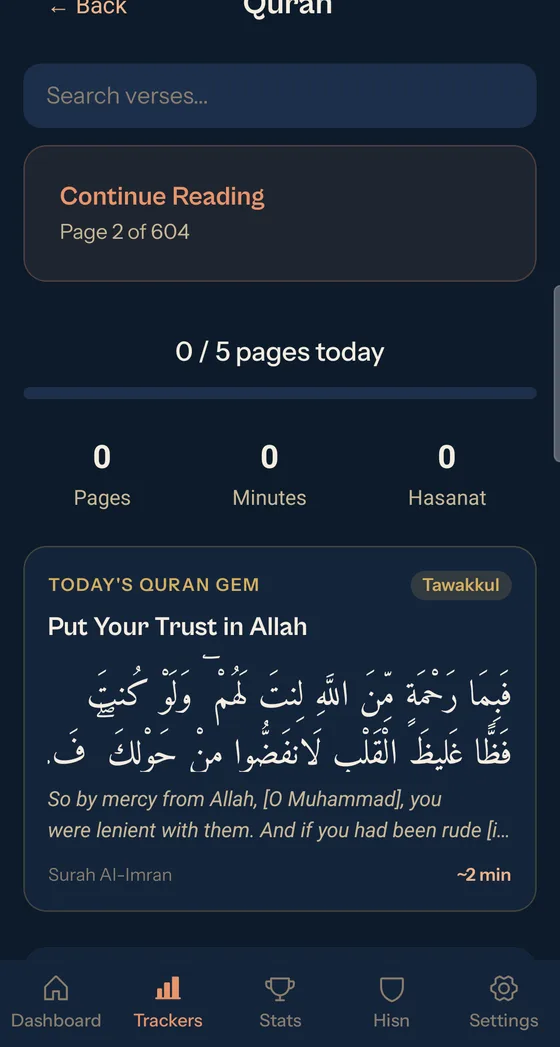
Quran reading screen inside the Nafs app
Quran reading inside Nafs.

CHOOSE YOUR PHONE’S SETUP

Know what your blocker covers.

iPHONE

Block trigger apps.
Enable adult-site protection.

The current iPhone release uses Screen Time to shield selected apps. App blocking requires iOS 16 or later. Enable the requested access in Nafs, then choose the apps you want to restrict.

Nafs also enables Apple’s adult-content filter for Safari and in-app WebKit on iOS 16 or later with the required Screen Time access. Coverage depends on your device and browser. Check protection on your phone, and use Apple’s web restrictions or another layer for uncovered routes.

Apple’s web-restriction instructions
ANDROID

Block trigger apps.
Set up Guard for adult domains.

Nafs uses Accessibility permission for blocking. Guard can identify and block known adult domains in supported browsers when that permission and protection are enabled.

Coverage depends on the browser and device. It does not filter every in-app feed, browser or device on your Wi-Fi. Check your setup and add another filtering layer for uncovered paths.

Check your filter safely

A removable blocker can be bypassed. If you repeatedly undo restrictions, add a trusted person to your plan. Keep adult-content protection separate from earned access to ordinary apps.

START WITH THE RIGHT EXPECTATIONS

Free to download.
Check the plan that fits.

Nafs offers optional in-app purchases. Plans, trials and free or paid feature limits can vary by platform and region. Review the current in-app offer before subscribing; the purchase screen shows your price and renewal terms.

Get Nafs

Know how your data is handled

Read the Nafs privacy policy for account, usage and attribution information. You do not need to describe your private struggle to read this page or choose a store.

A tool in your plan

Nafs supports phone boundaries and worship habits. It does not promise a cure, a recovery deadline or a clinical treatment program. If you need more support, see our guide to choosing qualified help.

BEFORE YOU DOWNLOAD

Questions about Nafs and quitting porn

How can Nafs help me quit porn?

Nafs helps you interrupt the phone habits that lead back to porn. Block selected trigger apps and open a supported worship activity such as Quran, dhikr or dua instead. Nafs also offers adult-site protection with platform and setup limits. Use these tools as part of your own plan, with additional filtering and support where needed.

Does Nafs block porn on both iPhone and Android?

The platforms differ. Android Guard can block known adult domains in supported browsers after the required Accessibility setup; it does not cover every browser or in-app feed. On iPhone, Nafs shields selected apps and enables Apple’s adult-content filtering for Safari and in-app WebKit on iOS 16 or later with the required Screen Time access. Check the protection on your own phone before relying on it.

Can I use Nafs for nofap or stopping PMO?

Yes, you can use Nafs to put boundaries around trigger apps and build a replacement routine while working on nofap or stopping PMO. This page describes blocking and worship features, not a dedicated abstinence counter or a clinical recovery program.

Can worship unlock adult content?

No. Earned screen time is for ordinary apps you choose to allow. Keep adult-content restrictions enabled separately; pornography is not something to earn access to. Nafs uses the exchange of worship for earned screen time in allowed apps.

Is Nafs free?

Nafs is free to download and offers optional in-app purchases. Available plans, trials and feature limits can differ by platform and region. Check the current offer in the app before subscribing; the purchase screen shows the price and renewal terms.

Is Nafs a treatment for porn addiction?

Nafs is a phone-boundary and worship-habit tool, not medical treatment or a guarantee of recovery. If the behavior feels hard to control or is harming your daily life, consider qualified professional support alongside practical phone restrictions.

BEGIN WITH ONE BOUNDARY

Give your next tap
a better direction.

Choose the app that starts the pattern.
Have Quran, dhikr or dua ready on the other side.

Download Nafs

iPhone & Android · Free download · In-app purchases